Posts

VANYWHERE — Turn Time and Skills to Cryptocurrencies That Pays Bills

Image
I hear some people saying they don’t have skills for any job so they tend to stick on what is there even if it is a low-paying job. Stuck on a job which they hate until they retire. I beg to disagree because even a housewife has a skill that she may offer or share with other housewives. Is it really their choice? Or is it only just because opportunity did not present itself to them? Now, what if your skills can earn you a crypto even during traffic hours, even when you are just staying at home, a PWD, or any status you have now, would you be joining a program, a project or a platform? (Remember that cryptocurrencies now are really popular and unlike FIAT or paper money that are affected by inflation, values may increase overtime.) With Vanywhere, time can turn into cryptocurrency. Real people, real skills, real time! Vanywhere is a skill-sharing platform that connects people who are seeking and offering skills via live video, voice & chat Well, ...
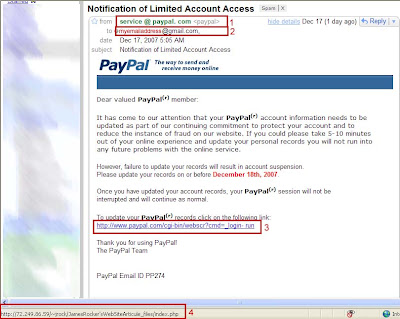
Paypal Phishing (Fake) Emails

Image
Phishingor fake emails are rampant online. When I was an active e-gold user, I get phishing emails almost everyday. Since my e-gold email is separate from my regular email, I just ignore all emails that inform me my e-gold account was blocked. Today, I received a Paypal phishing (fake) email. It is not the first time but I still decide to post it here since some web users are not yet aware about phishing emails. Below is a screenshot of the Paypal phishing email that I received. item #1 - Taking a closer look, the email header has spaces between "service", "@", "paypal." and "com" item #2 - It is only the email address that was placed. item #3 - Hovering the mouse over the link, the links points to item #4 and not the link that is displayed in item #3. Below is a screenshot of the headers of real Paypal email correspondence. items #5 and #7 have no spaces item #6 shows the full name you registered with Paypal followed by Paypal e...

Free Webhosting For Your Website

Getting a webhost can be very expensive but while starting out, using a free webhost is just practical. I started with a free webhosting myself and still maintain the site. Eventhough I have now my own (shared) webhosting, I am still on the lookout of what webhosts can offer quality service like ads-free, allows add-on domains subdomains, database, reasonable capacity and bandwidth. If you are like me, then I suggest you check this latest free webhost on my list . The free hosting has the following features 250 MB of Disk Space - Enough free disk space for your files and email 100 GB Bandwidth! - Lots of bandwidth if you do not allow users to download big files such as movies, mp3 or programs. Full Domain Hosting - We can host www.yourdomain.com or you can chose our free subdomain. cPanel Powered Hosting Most advanced hosting control panel is ready for you. cPanel has features like: Webmail, File Manger, Backups, Password Protect Directories, Subdomains, Redirects, phpMy...

Better Late Than Never

I was site hopping again today (yesterday actually, because my browser stopped working while I was writing this post so I went to sleep) waiting for my downloads to finish when I searched on who might have mistakenly or generously gave some linky love on my one of my sites. To my surprise, I found a linky love at TheNextPost Although he made the post on April 2007, I believe it is never too late to express gratitude for such a generous act. If you visit his blog, you can start reading from the latest post and go on reading until the last post. You might even want to read the next page's posts since all posts are quite interesting. One of the entries you should check is his post on " 10 Great Articles of 2007 & Why You Should Read Them ". You might agree or disagree with the contents of those blog posts that made it to the list but for sure, visiting them will be a lot of readings to do for a day

Using Unionbank EON Cyber Account with Moneybookers

Moneybookers is an online payment processor. If you do not have yet an account, you can sign up here . If you already have an account, then you need to verify it. To verify your EON cyber account with Moneybookers Moneybookers will charge an indefinite amount on your EON debit card. You must enter the correct dollar amount debited on the space provided. Take note that your online EON account will reflect the amount in peso so you need to convert it into dollars. You may call customer service for the currency exchange rate of Unionbank or you may purchase an item, say worth $1, and use it as the base of your conversion. Moneybookers will also send a postal mail to the address you provided Open your Moneybookers account and input the code found on the posted mail. Once done, your account is considered verified. To withdraw funds from Moneybookers to your EON Cyber account You need to add a bank account to your Moneybookers account Since EON Cyber Account is part of Unionbank Philippines,...

Successful Withdrawal of Paypal to GSIS Ecard

Since Paypal was finally approved to be fully accessible to Philippine users, many Philippine Paypal users have successfully withdrawn their Paypal funds to their bank accounts. Now, it is my turn to say I finally got my Paypal funds. I can say that Unionbank's service has greatly improved lately. Based on previous feedbacks from other Paypal users, it took them about 2 to 3 weeks to finally receive their funds. Most of them used Unionbank's EON Visa Electron Card. I was waiting for feedback from other GSIS ecard users before making a withdrawal but since I can no longer wait (looks like only very few on my sector are still aware of Paypal's existence), I went ahead and made my withdrawal. My transaction was only about 3 (or 4 ) days which will depend on how you count the days. I made my Paypal withdrawal last November 17, 2007 and funds were on my GSIS ecard last November 20, 2007. So if you have an unverified Paypal Philippines account and you have a GSIS ecard, you can ...

Dreamhost Discount Coupon Codes

It took me such a long time to figure out how to set-up the maximum discount of $97 from Dreamhost. I also found out that there are also other Dreamhosters who experienced the same. Maybe, my question was not clear enough or maybe the options were not obvious enough for me to figure out easily. To help others who might be using Dreamhost in the future, I will be giving the obvious answer here. To set-up your Dreamhost $97 discount coupon code 1. Visit https://panel.dreamhost.com/index.cgi?tree=home.rew& 2. Click on the last link on the page "Create Your Own Promo Codes!" 3. Click on the link "Create a New Dreamhost Promo Code" 4. Fill-up the space for Promo Code and Description. Leave the bonuses as is, or no bonuses Here comes the not so obvious part 5. On the table "This promo code's discounts:", the last column is labeled "This Code's Discount". If you notice, the values are set to $0.00. You change those $0.00 into the amount of...

Battle between PayPerPost and Google Pagerank

Well, this post is only to affirm what others may have already found out. I am quite a bit late again, as usual, as I was busy organizing my files for a new project I have in mind. I was about to rest for the day when I received the ezine from Easy Wordpress with the heading " Will PPP Bloggers Receive the Next Google Slap? ". What is this all about?!? Being a Payperpost blogger, it naturally caught my attention. Another PR update? Didn't Google updated the PR first week of November? I just checked my PR before the weekend and it was still in PR2. After reading the whole article and the comments at Easy Wordpress, I went to check my PR and it is now a PR0. Luckily, I have not used my other blogs for any paid blogging jobs (As if I have enough time to maintain other blogs... lol) There are questions out there, PPP, paid blogging or Google PR? For sure, votes are divided again. PR and rate for paid blogs are directly proportional somehow. No PR, lower payout for paid blogs...